

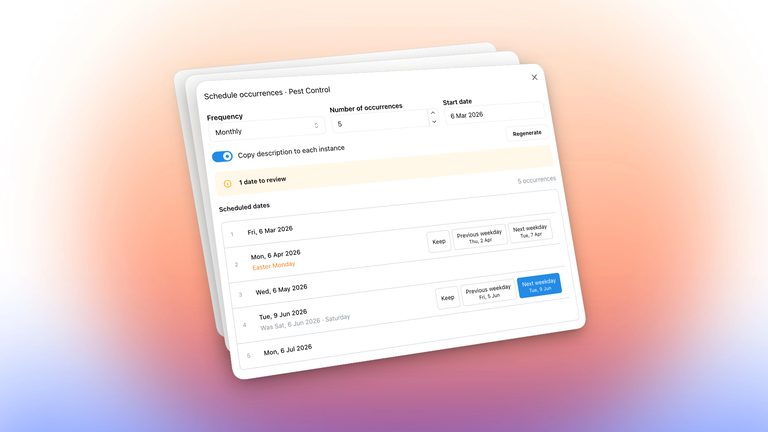
This update makes it easier to plan maintenance, keep track of borrowed keys and see what’s coming up at your building. We’ve also added amenity colours to the calendar and spreadsheet imports for vehicles.
Maintenance Scheduling Improvements
The maintenance scheduler now flags weekends and public holidays, helping you plan visits around dates that may not suit your building or contractors.
You can review and adjust individual visit dates before saving the schedule. We’ve also improved timezone handling so maintenance dates stay consistent with the building’s local time.
More Useful Building Dashboards
The building dashboard now brings upcoming activity and recent Shift Log notes into view.
Use the Shift Log to capture day-to-day observations, reminders and handover notes for your team. With recent notes visible on the dashboard, it’s easier for the next person on duty to catch up on what’s happened and what needs attention.
Check the schedule, catch up on notes from your team and open the relevant records directly from the dashboard.
Amenity Colours on the Calendar
You can now choose a colour for each amenity. Bookings use that colour on the site calendar, making it easier to distinguish the pool, meeting room and other shared facilities at a glance.
Import Vehicles from a Spreadsheet
Add vehicles in bulk by importing a spreadsheet, with each vehicle linked to its unit.
This makes it quicker to set up a vehicle register or bring an existing list into Onsite without entering each vehicle individually.
Key Return Dates and Clearer History
You can now set a return date when checking out a key and see which keys are overdue.
We’ve also improved the key register, resident checkout details and transaction history, making it easier to see who has a key and follow its check-in and checkout activity.