

Automatic Workorders
1 min read Updated
Automatic Workorders
The Maintenance feature in Onsite allows you to configure automatic work orders to be sent from the platform.
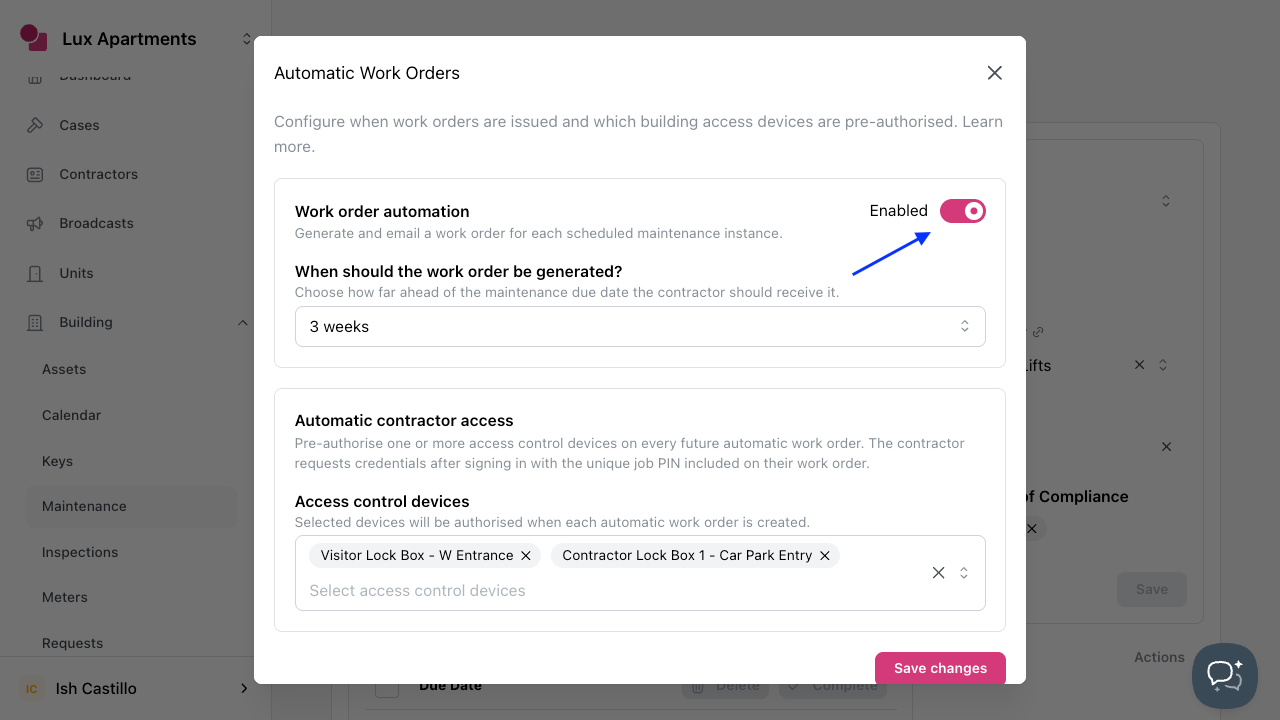
To create a recurring or automatic work order
- Create or open a maintenance item.
- Select Work Orders in the toolbar.
- Enable Automatic Work Orders & select the notice window.
- Set up Automatic contractor access (if applicable).
- Click Save changes.
Required Settings for Automatic Work Orders
To automatically issue work orders, you must enable the option in settings and configure an email sender identity.
- Navigate to Settings > Configuration > Maintenance.
- Enable Automatic Work Order settings.
- Select an Email Sender Identity to use.
- Click Save.
Conditions required to generate and send a work order
- Maintenance must be linked to a contractor.
- The contractor profile must have a valid email.
- The maintenance instance must not already have a linked case.
Was this article helpful?
Thanks for letting us know.
Thanks, we'll use this to improve the article. Still stuck? Email support@onsite.fm and we'll help.