

What is a building management system?
Heating, cooling, lighting and the cost of leaving them running. Get to know your BMS and try the controls for yourself.
· Nathan Croxton · Software Guides · 6 min read
A building management system (BMS) monitors and controls connected equipment such as air-conditioning, ventilation and lighting. It gives building operators a place to check readings, set operating hours and investigate alarms.
Try it below. Choose After hours to see what happens when the room is empty, or change the people, sunlight and outside temperature to see the BMS adjust automatically.
Try the controls
See how one room responds to people, sunlight and temperature.
Try the scenarios, or change the conditions to see how automation responds.
This fictional room responds instantly; real buildings take time. The energy index compares demand within the simulation. It doesn't predict bills, NABERS stars or ENERGY STAR scores. Settings are for demonstration only.
How the controls work
On a hot afternoon, a room sensor reports that the temperature has risen above its target. The controller asks for more cooling. As the room cools, the sensor feeds back a new reading and the controller adjusts again.
The same approach can apply to lighting and ventilation. Connected blinds can reduce heat from the sun; lights can dim when there’s enough daylight; fresh-air ventilation can increase as more people use a room. The Australian Government’s BMS guide explains why accurate sensors and properly tuned controls matter.
| Input | What it can help control or reveal |
|---|---|
| Room and outdoor temperature | Heating and cooling demand |
| Occupancy and operating hours | When occupied settings should apply |
| Daylight | Artificial lighting and motorised blinds |
| CO₂ | Fresh-air ventilation demand |
| Equipment status and alarms | Plant that needs investigation |
| Electricity and water meters | Consumption patterns and unusual use |
CO₂ is one measure used for ventilation, rather than a complete picture of air quality. ABB and Schneider Electric describe examples of these sensors and control strategies.
Your building’s setup determines which of these functions are available. Ask for a list of what is connected and whether each connection allows monitoring, control or both. You may also see the terms BAS (building automation system) or BMCS (building management and control system).
What does a BMS look like?
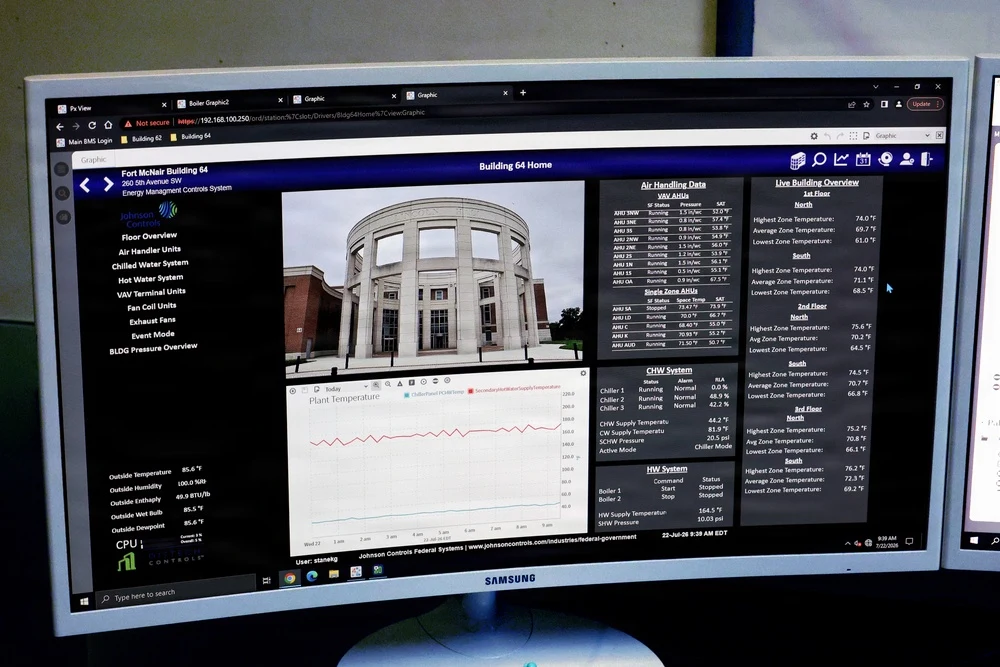
The operator’s screen
Equipment status, temperatures and trend charts are usually what the operator sees. This Johnson Controls dashboard monitors Building 64 at Fort McNair in the United States.
The control cabinet
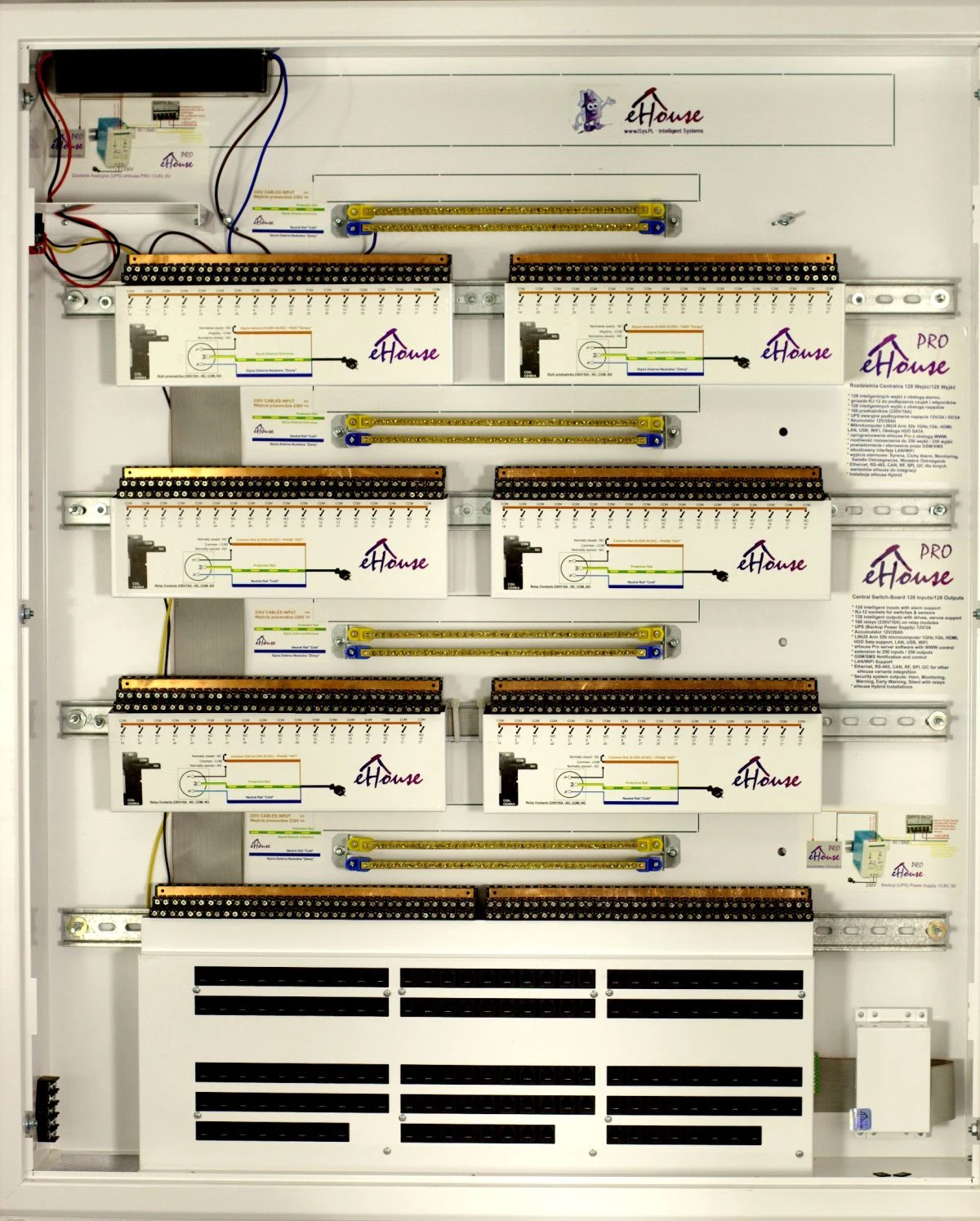
The screen connects to physical controls. This eHouse PRO switchboard shows controller and relay modules with rows of connection terminals. In a larger installation, control cabinets may be spread around the building near the equipment they serve.
Common BMS brands
You may recognise the manufacturer’s name on a control cabinet and a different product name on the login screen. Here are some names to look for:
| Brand | BMS product or platform |
|---|---|
| Schneider Electric | EcoStruxure Building Operation |
| Siemens | Desigo CC |
| Johnson Controls | Metasys |
| Honeywell | Optimizer Supervisor |
| Delta Controls | enteliWEB |
| Automated Logic | WebCTRL |
| Tridium | Niagara Framework |
Niagara is also used inside other suppliers’ systems, including Honeywell Optimizer Supervisor. If you’re arranging service, give the contractor both the brand and product name, plus the version if you have it.
What unnecessary operating hours cost
Say someone extends the air-conditioning hours for an evening meeting. The meeting ends, but the schedule is never changed back. The equipment keeps running into the evening, even when the rooms are empty.
A BMS schedule or trend can help you spot that. The cost comes down to how much power the equipment draws, how long it runs and your tariff.
For a worked example, assume equipment draws an average of 10 kW during three unnecessary hours each working day:
10 kW × 3 hours × 250 days = 7,500 kWh per year.
At an assumed $0.30 per kWh, that’s $2,250 a year in energy charges. Use your own measured consumption and tariff to work out the cost for your building; fixed supply charges and demand charges are separate.
Before changing the schedule, check who still uses the space and what services they need. Record the change, then compare meter readings over a suitable period, allowing for weather, occupancy and operating hours. A cheaper bill alone won’t tell you whether the equipment became more efficient. The tariff may have changed too.

Energy is one part of the operating budget
A building also has water bills, servicing, repairs, cleaning, waste collection, staffing, insurance and administration costs. A tower with lifts, a pool and central air-conditioning has different expenses from a block with few shared services.
A BMS helps with the equipment side: running hours, meter readings and fault history. When weighing up an upgrade, include sensors, installation, commissioning, licences, support and staff time in the cost. Ask the supplier to show how the proposed work addresses a problem you’ve actually identified.
NABERS and building energy ratings
NABERS stands for the National Australian Built Environment Rating System. NABERS Energy compares measured energy performance with similar buildings, accounting for factors such as location and operating conditions. Its scale goes up to 6 stars.
Offices
An office rating can cover the base building, a tenancy or the whole building. That boundary matters: central air-conditioning and lifts may sit in the base-building rating, while tenant equipment sits elsewhere. Office ratings use 12 months of actual performance data and an accredited assessment. The office rating guidance sets out what to prepare, including bills, metering information and after-hours air-conditioning logs.
Apartment buildings
NABERS Energy for apartment buildings assesses common property, including lifts, common-area lighting, mechanical ventilation and pools. Individual apartments are outside that rating.
For a building manager or committee, this makes the rating useful when reviewing shared energy costs. Better schedules and well-maintained plant can improve performance, but the rating comes from measured results. Buying a BMS doesn’t earn stars on its own.
Where ENERGY STAR fits
In the United States, the EPA’s ENERGY STAR programme gives eligible building types a 1–100 score based on measured energy use compared with similar buildings. A score of 75 or higher is one requirement for certification, alongside other eligibility and verification requirements.
ENERGY STAR scores and NABERS stars aren’t interchangeable. For an Australian building, check the relevant NABERS rating first. Appliance energy-rating labels are a separate measure again.
Tools that work with a BMS: CIM and Bueno
A BMS can collect more data than a team has time to review. Analytics tools use that data to help find faults and wasteful operation.
CIM PEAK connects to BMS and other building data to identify mechanical faults and opportunities to improve performance. That can give an operator somewhere to start investigating, rather than manually checking every trend.
Bueno provides energy management, fault detection and building optimisation tools. Its integration information lists major BMS platforms including Honeywell, Siemens and Johnson Controls.
For either tool, ask the supplier to check your BMS version and available data points. Confirm whether the connection reads data or can also write control commands, what setup is needed, and who handles ongoing support.
When an alarm needs a contractor
Try the HVAC fault button in the simulator. The controller still requests cooling, but the room stays warm. Turning the target down won’t repair the failed component.
In a real building, the useful handover is specific: which unit, which room, when the problem started and what the readings show. Attach that information to the work order. After the visit, check that the equipment is working and keep the repair notes against the asset. A completed visit doesn’t necessarily mean the fault has gone away.
This is where Onsite fits: organising the contractor, work order and asset history around the equipment. CIM and Bueno are examples of BMS analytics tools; connections to Onsite would need to be scoped separately.
For more on managing the work, see our building maintenance software guide or building management software comparison.