

Accounts (Chart of Accounts)
1 min read Updated
Accounts (Chart of Accounts)
An Account is a single line in your site’s chart of accounts. It’s the list of budget codes used to track income and spending for a building. Together, your accounts make up the budget structure that invoices and reporting are measured against.
What’s in an account
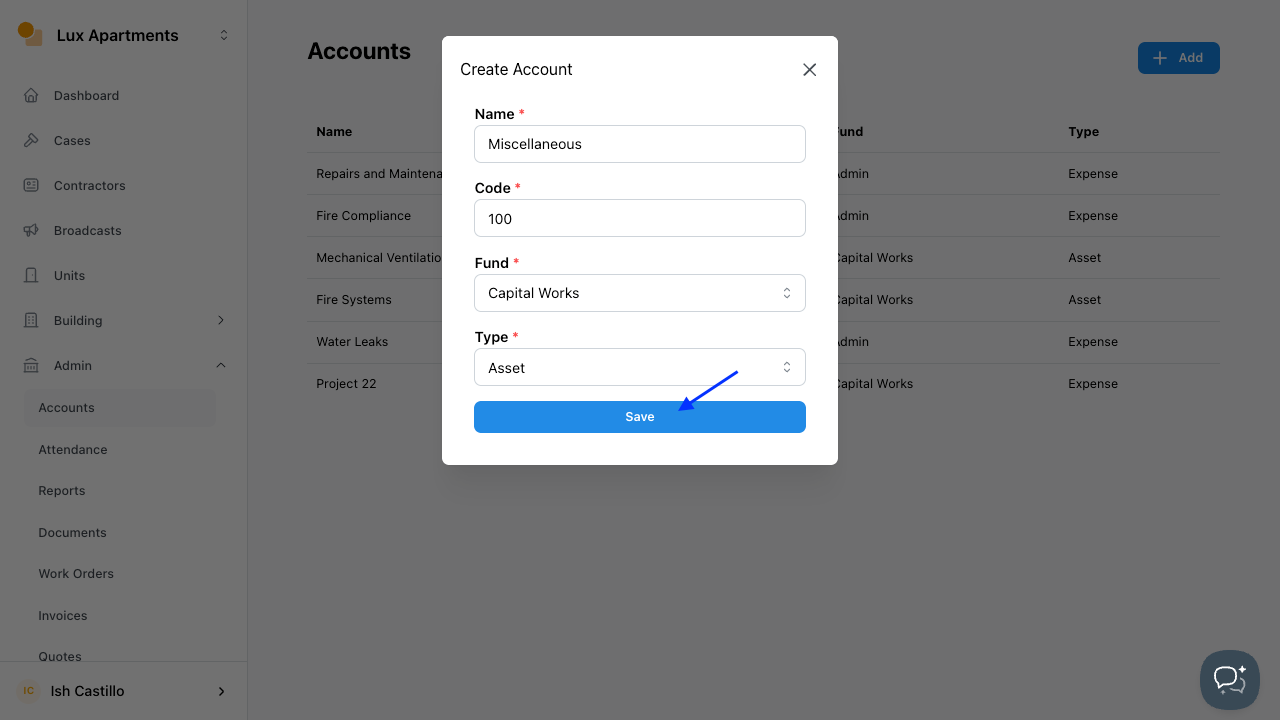
Each account line captures four details:
- Name: A plain description of the account (e.g. Repairs & Maintenance).
- Code: A short code for the account. Each code is used once per site.
- Fund: Which fund the account belongs to Admin or Capital Works.
- Type: The kind of account Asset, Liability, Revenue or Expense.
How accounts relate to invoices
Accounts are mainly used with Invoices. When you record an invoice, you can tag it to an account so the spend rolls up under the right budget code. This keeps your reporting accurate and makes it easy to see how actual costs compare to budget for each account.
Adding an account
- Go to Site → Admin → Accounts.
- Click + Add.
- Enter the Name, Code, Fund and Type.
- Click Save.
You can edit an account at any time as your budget structure changes.
Tip: There’s no file import for accounts. If you have an existing chart of accounts to load, contact our support team and we can help set it up for you.
Was this article helpful?
Thanks for letting us know.
Thanks, we'll use this to improve the article. Still stuck? Email support@onsite.fm and we'll help.